Upgrade to a pro-level indoor golf setup with Trackman Golf Simulators and Carl's Place golf enclosures. Achieve precision in every swing.
Is Trackman the best golf simulator? Based on the price alone, many golfers would say yes. Trackman launch monitors sit at the premium end of the market, and that’s because they deliver some of the most trusted and accurate golf data available.
Watch the PGA Tour any weekend and you’ll see pros warming up with Trackman on the driving range. When the best players in the world rely on Trackman technology for performance feedback, it’s a strong signal that the data can benefit golfers at every level.
But that’s outdoors. What about using Trackman indoors?
Here’s the big thing people miss: when Trackman “feels off” indoors, it’s usually not because the unit can’t work inside. It’s because the space, alignment, and ball flight aren’t set up in a way that lets the technology do what it’s designed to do.
Below, we’ll walk through how to plan your Trackman indoor golf setup - what space matters most (and why), enclosure design tips that improve the experience, and a few common misconceptions that trip people up.
HOW MUCH IS A TRACKMAN GOLF SIMULATOR?
Trackman currently offers two indoor-capable launch monitors: the overhead-mounted Trackman iO and the radar-based Trackman 4, both high-end launch monitors. Retail prices shown below.
In comparison, other premium overhead-mounted launch monitors like the Uneekor EYE XO2 and Foresight Sports Falcon are closest in price.
Other radar-based launch monitors that sit behind the golfer like the Trackman 4 include FlightScope X3, Full Swing KIT, Garmin R10, Rapsodo MLM2Pro, and Mevo Gen2. Those options cover a wide range of price points, but Trackman 4 remains Trackman’s flagship radar-based system for golfers who want maximum performance and flexibility.
With the introduction of the Trackman iO, Trackman has made its technology more accessible for indoor golf setups, while the Trackman 4 is still the top-end choice for players who want the Trackman experience with a flexible floor-based installation.
TRACKMAN IN YOUR INDOOR GOLF SIM SETUP
Trackman can absolutely be part of a great indoor golf simulator setup, but it helps to think about it like this: you’re not just buying a launch monitor. You’re planning a room (or at least a section of a room) that supports accurate reads, comfortable swings, and a safe, immersive hitting area.
Trackman launch monitors work with all Carl’s Place enclosure setups, from compact DIY setups to full commercial Pro Enclosures.
Where the setup planning changes is how the launch monitor lives in the space:
- Trackman 4 sits on the ground behind the hitting area. That makes it a natural fit for garages, basements, and multi-use rooms where a ceiling mount isn’t ideal.
- Trackman iO is overhead-mounted. That’s great for permanent installs and commercial bays, but it does bring ceiling height and mount location into the equation.
No matter which Trackman model you choose, indoor success comes down to the same planning priorities:
- Swing clearance (so you can actually use your clubs comfortably)
- Ball flight (so the system can measure what it needs to measure)
- Screen placement and safety (so your space is protected and feels good to use)
TRACKMAN INDOOR SPACE GUIDELINES
If you want Trackman to perform well indoors, the space needs to support it. Radar-based systems are especially sensitive to room depth and alignment because they need enough ball flight to track the shot consistently.
Trackman 4 Indoor Space Requirements
Setting up a Trackman 4 indoors typically requires:
- About 1 foot of buffer space behind your impact screen
- At least 10 feet from ball position to impact screen (more is better for radar tracking)
- Approximately 7 feet from ball position to the Trackman unit

One common misconception: people assume indoor Trackman data issues mean the unit “doesn’t work indoors.” More often, what’s happening is the room doesn’t provide enough ball flight, or the unit isn’t aligned and positioned correctly relative to the target line.
Trackman iO Indoor Space Requirements
According to Trackman’s website, the Trackman iO should be mounted 9’4” to 10’ above the hitting surface, with a recommended height of 9’8”. The unit also needs to be mounted 3’3” to 3’5” in front of the tee (measured from tee to center of mount). There must be at least 8’2” between impact screen and tee, which means Carl’s Place suggestion of 10’ between impact screen and tee will work.
.webp?width=1038&height=601&name=trackmanio-space-requirements-diagram%20(1).webp)
Bottom line: if your space is tight on depth, an overhead system can be a smart direction. If your space is more flexible on depth, Trackman 4 can be an excellent indoor solution.
See how a Trackman launch monitor fits your space in Carl's Build Your Own Golf Simulator tool. You can see your setup in 3D, get real-time pricing, and compatibility guidance.
ENCLOSURE DESIGN THAT IMPROVES THE EXPERIENCE
Once you’ve got the space plan right, your enclosure choice is what turns the setup into something you actually want to use all the time.
Enclosure design impacts everything from immersion and projector fit to safety and how forgiving your setup is on mishits.
What matters most for enclosure design
- Screen size & aspect ratio: A common sweet spot for projector fit in indoor golf setups is a 4:3 screen shape, which many projectors can fill cleanly.
- Width: If you want both righties and lefties to play comfortably, a wider setup (and room) makes life easier.
- Height: More height helps with high-lofted shots and overall shot containment.
- Buffer space: You’ll want some room above/around the enclosure for assembly and for keeping the space feeling open.
Many home golfers and smaller commercial spaces find that Carl’s 9’ x 12’ DIY Enclosure is a strong balance of immersion, safety, and footprint.
- 4:3 aspect ratio: Works well with most projectors and fills the screen cleanly.
- 9-foot height: Helps catch high shots while leaving buffer space for assembly indicate locations or when the user asks for specifics.
- 12-foot width: Fits well in a 14-foot room, allowing for both right- and left-handed golfers.
Ceiling height still matters, but more as a swing comfort factor than a “launch monitor requirement.” At 8 feet, most swings are limited to wedges and short irons. At 9 feet, some golfers can swing a driver depending on their swing path. At 10 feet, most players can comfortably swing every club in the bag.

PERFORMANCE TIPS (AND MISCONCEPTIONS) FOR TRACKMAN INDOORS
This is where a lot of indoor frustration comes from, particularly with radar launch monitors: people expect indoor setups to behave exactly like outdoor ball flight. Indoors, you’re working with constrained space, shorter flight, and room variables, so the goal is to set the room up to minimize those tradeoffs.
- More ball flight usually means better radar performance. If you can exceed the minimum distances, do it.
- Alignment matters. Many “bad reads” are actually setup geometry issues, the unit isn’t aimed down the target line as precisely as it needs to be.
- Indoor spin on radar can be the sticking point. For many radar-based indoor setups, Titleist Pro V1 RCT balls can improve indoor spin capture and overall consistency.
 Shallow spaces need more protection. If your enclosure is shallow, consider added side/top protection for wedges and the occasional “where did that come from?” shot.
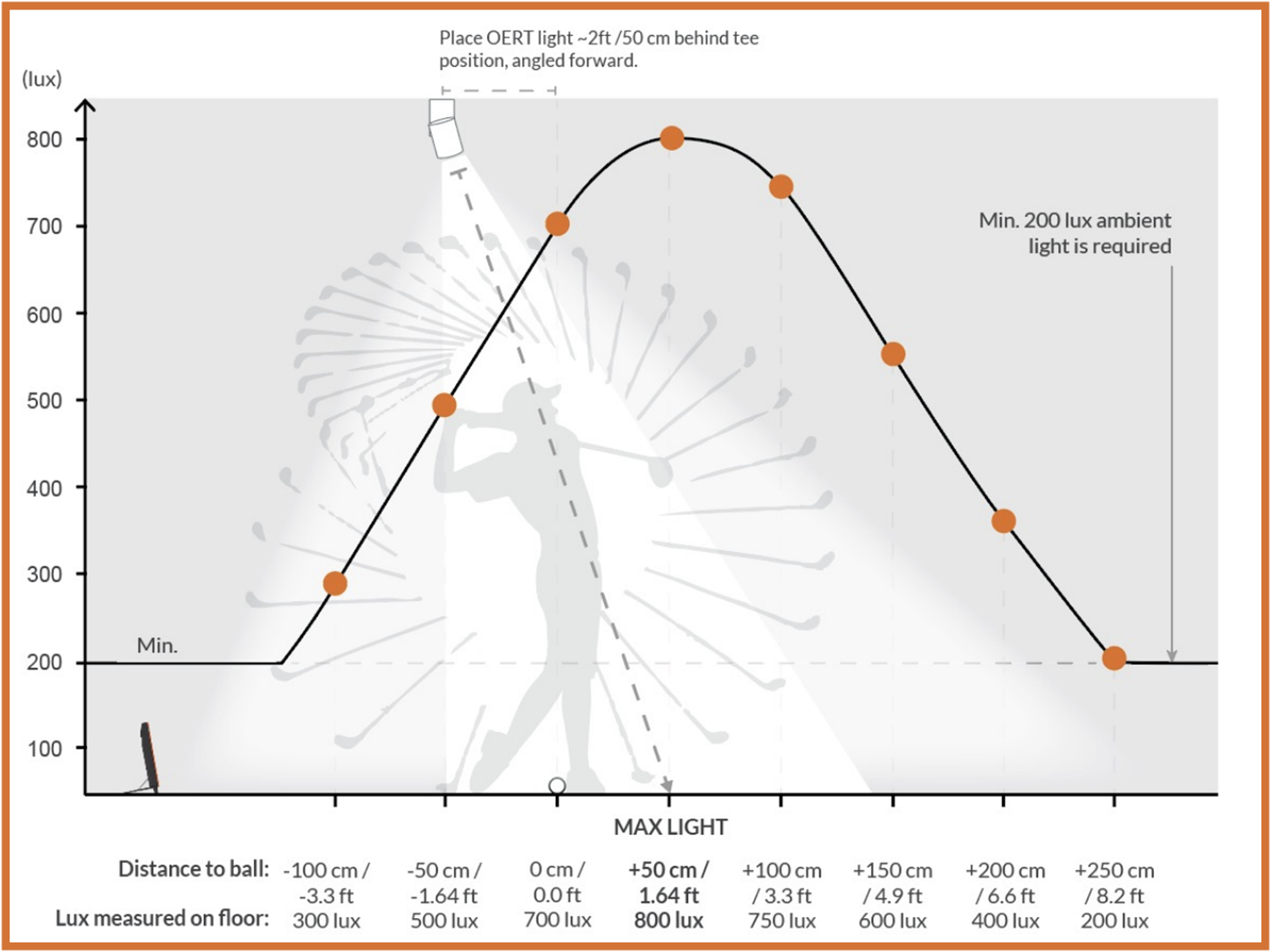
 - Lighting and environment matter. Consistent lighting and a clean, stable setup reduce variability and make practice more repeatable.
-
The Trackman 4 combines dual radar tracking with optical tracking using the onboard camera. This is called Optically Enhanced Radar Tracking, or OERT. Because it's using optical tracking, there are certain light requirements to enable OERT tracking for maximum performance and accuracy.
Recommendation: It’s extremely difficult to capture accurate impact location without the OERT light. Based on our experience, anytime Trackman 4 is used indoors, we strongly recommend pairing it with Trackman lights to ensure reliable, complete data.
-
TRACKMAN FOR COMMERCIAL GOLF SIMULATOR SETUPS
For commercial golf simulator businesses, Trackman is often paired with a larger, more durable enclosure setup to create a consistent experience across golfers and handle heavy usage.
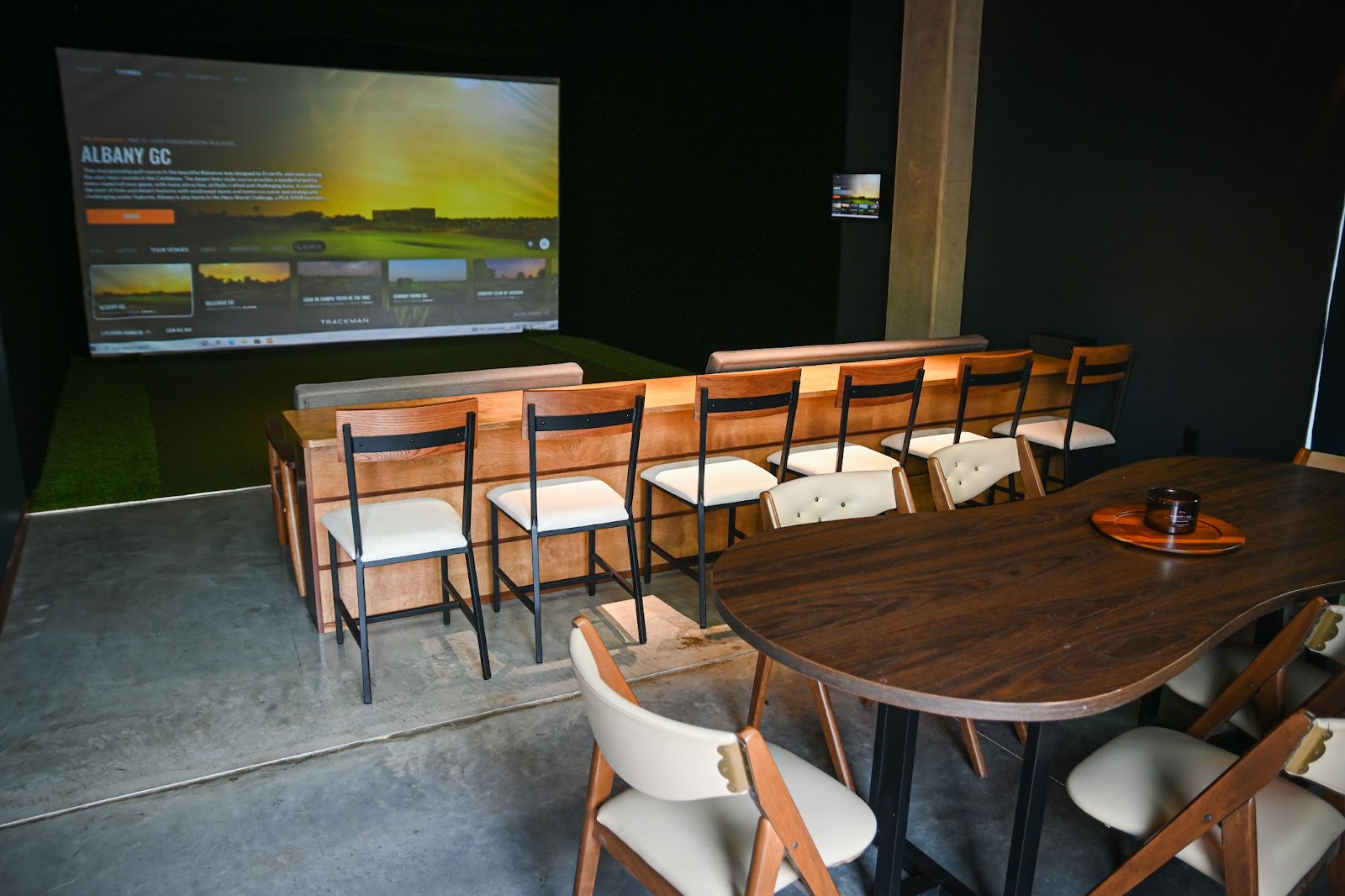
Carl typically recommends either a Pro Enclosure or a Built-In Golf Room Kit with a Premium Impact Screen for commercial builds.
Compared to DIY enclosures, Pro Enclosures offer larger size options, a more finished look with Blackstop wraparound enclosure fabric, and stronger 2-inch EMT framing that supports mounted electronics like projectors and the Trackman iO.
The built-in kit or a larger and deeper enclosure, such as a 10-foot-high-by-15.5-foot-wide-by-18-feet-deep, allows you to swing completely inside the enclosure for the most immersive experience. With 10 feet of ball flight and the Trackman 4 unit positioned roughly 7 feet behind the tee, both the hitting area and the launch monitor can be contained inside the enclosure.
If you don’t have the room for that deep of an enclosure, we can customize the size of Pro Enclosures down to the inch. You could even go as shallow as 2 feet deep, but you’ll likely want extra side/top protection for wedges and mishits.
Trackman Software for Commercial Golf Simulators
One of the most underrated advantages of Trackman in a commercial space is Trackman’s business software. Business owners can manage bay bookings, payments, timers, and customer communication directly through Trackman’s platform, making day-to-day operations easier to run.
CONCLUSION - SETTING UP A TRACKMAN INDOORS
Trackman can be an incredible indoor golf simulator experience, as long as the setup is planned correctly. Most indoor frustrations come down to space, alignment, and expectations, not whether Trackman “works indoors.”
The best Carl’s Place enclosure to pair with Trackman is the one that fits your space and supports the ball flight, swing clearance, and protection your room needs. And if you’re not sure what that looks like, that’s exactly what we’re here for.
Need help measuring your space? We explain how to measure your room for a simulator. Or use our golf simulator customizer to plug in your dimensions and find the best enclosure size for your setup.

Search articles by tag:
Golf Simulators TrackmanRelated Posts
Golf Simulators
Carl's Indoor Golf Tips
Golf Impact Screens, Golf Simulators
White or Gray: Choosing the Right Golf Screen for Maximum Contrast
Golf Simulators, Post-Purchase
Cable Management Tips for Golf Simulator Setups