Launch monitors are the brain of your golf simulator. At Carl’s Place, we test and use them every day, from Garmin and FlightScope to Uneekor, Foresight, NVISAGE, Trackman, GolfJoy, SkyTrak, and more. If you want your setup to feel like real golf instead of “I hit a ball into a net and hope,” choosing the right launch monitor is where it all starts.
What is a launch monitor?
A golf launch monitor is an electronic device that reads all the important data of a golf ball as it's struck in a golf simulator. It sits near, above or around the hitting area. That data that comes from what your club and ball do at impact and during the first part of ball flight is then transmitted to a software program on a tablet or computer to show your shot distance, shape, spin, and more.
Long story short, a golf simulator is nothing without a launch monitor. From driving ranges, club fitting facilities or golf entertainment venues such as Top Golf, X-Golf, Club Champion or GOLFTEC, to some of the most basic home golf setups, golf launch monitors can be found everywhere and anywhere. The development of launch monitors and their continuously improving technology has altered the trajectory of the sport of golf.
At Carl’s Place, we use, test, and sell the most popular units on the market. This guide walks through how to choose one that fits your room, your goals, and your budget.
Quick Guide to Selecting a Golf Launch Monitor
Lock in your non-negotiable dimensions
Set your data, software, and course-play needs
Pick a budget lane that matches your goals
How to Choose a Launch Monitor
1. Decide where your golf simulator is going, and measure your room
The first step is not brand or price, it is your room. If the launch monitor cannot work with your ceiling height, room depth, and swing, nothing else matters.
Grab a tape measure and jot down three key numbers:
- Ceiling height: From floor to ceiling at the hitting area. This drives whether overhead units and full swings with driver are realistic.
- Room depth: From the wall behind you to the wall or impact screen in front of you. This is critical for radar units that sit behind the golfer and need ball flight.
- Room width: From side wall to side wall. This affects comfort, club clearance, and whether you can center the hitting area or need to offset it.
As a general guideline, many home golf simulators are comfortable around 18 feet deep, 14 feet wide, and 10 foot ceilings. Some golfers make a setup work with less, others need more. Your measurements will point you toward the launch monitor type that actually fits instead of one you hope will fit.
2. Match your room to a launch monitor type
Now match those dimensions to how you plan to use the space. Each launch monitor type “uses” the room differently:
- Overhead (ceiling mounted): Mounted above and typically in front of the ball. Great for dedicated rooms and commercial bays, keeps the floor clear, and works well when right and left handed players share the same bay. Overhead units usually need to be mounted high enough over the hitting area (often around 9.5–10 feet or more) while still clearing your swing.
- Radar (behind the golfer): Sits several feet behind the hitting area and watches ball flight toward the screen. Radar loves depth. It is best in deeper rooms, long garages, or spaces where you can leave several feet behind the golfer plus a healthy amount of ball flight in front of the tee.
- Photometric or camera-based (beside or just in front of the ball): Sits next to or slightly ahead of the hitting area and focuses on impact through high-speed images. This style is efficient in shallower rooms where you cannot spare extra feet behind you but still want accurate data and full simulation.
Once you know whether overhead, radar, or beside-ball cameras fit your room, you have already narrowed the list based on reality instead of marketing hype.
3. Decide how serious you are about the data and your budget
Next, layer in how hard you want this thing to work for your game:
- Casual practice and entertainment: You mostly want carry distance, ball speed, basic shot shape, and fun course play. Entry-level radar units and budget photometric systems can cover this well.
- Serious home use and game improvement: You want consistent data, more ball and some club metrics, decent video tools, and stable software. This is where mid-range radar, photometric, and some overhead units shine.
- Coaching, fitting, or commercial bays: You need deep ball and club data, high uptime, video tools, and strong software ecosystems. Durability, support, and multi-user convenience matter a lot.
Then pair that with a budget range:
- Entry-level: Portable radar such as Garmin R10, Rapsodo MLM2PRO, and Mevo Gen2 provide a lot of value and can work both indoors and on the range.
- Mid-range: Photometric and overhead units such as Uneekor EYE MINI, Foresight GC3, SkyTrak+ / SkyTrak Max, ProTee VX, and NVISAGE N1 are strong choices for serious home setups and smaller commercial spaces.
- High-end: Overhead systems like Uneekor EYE XO / XO2 / EYE XR, Foresight Falcon, Trackman iO, and flagship photometric units like GCQuad / QuadMAX and Trackman 4 sit at the top for performance and features.
Once you understand your space, your data expectations, and your budget, you are ready to look at specific models instead of guessing.
Launch Monitor Types and Who They Fit
Overhead Launch Monitors
Overhead units mount above and usually in front of the hitting area. They look clean, stay out of the way, and are ideal for shared bays that need to work for both right and left handed golfers without moving the unit.
- Best for: Dedicated simulator rooms, commercial bays, teaching studios, league play, and anyone who hates clutter around their feet.
- Watch for: Ceiling height, mounting location, and cable routing. Installation takes more planning than placing a unit on the floor.
Overhead examples:
- Uneekor EYE XO / EYE XO2 / EYE XR
- NVISAGE N1
- Foresight Falcon / GCHawk
- Trackman iO
- ProTee VX
- GolfJoy GR2
Radar Launch Monitors
Radar units sit behind the golfer and watch the ball travel toward the screen. Many are designed for both indoor and outdoor use, which is part of their appeal.
- Best for: Deeper rooms and garages, players who want one device for the simulator and the driving range, and golfers who like seeing a larger portion of ball flight.
- Watch for: Required distance behind the ball, ball-to-screen distance, and potential interference from fans, metallic objects, or people walking through the radar beam.
Radar examples:
- Garmin R10
- Mevo Gen2
- Rapsodo MLM2PRO
- Full Swing KIT
- Trackman 4
Photometric and Camera-Based Launch Monitors
Camera-based systems sit beside or just in front of the hitting area and focus on impact. They are usually the best choice when room depth is limited.
- Best for: Shallow rooms, lower ceilings where overhead is not an option, and players who care more about consistent indoor data than outdoor portability.
- Watch for: Lighting, exact unit placement relative to the ball, and keeping the hitting zone inside the cameras’ view.
Photometric and camera-based examples:
- Garmin R50
- Uneekor EYE MINI / EYE MINI Lite
- Foresight GC3
- Foresight GCQuad / QuadMAX
- GolfJoy Spica 3
- SkyTrak+ / SkyTrak Max
See Carl's ranking of the best launch monitors out there for each type of setup.
Launch Monitor Space Requirements
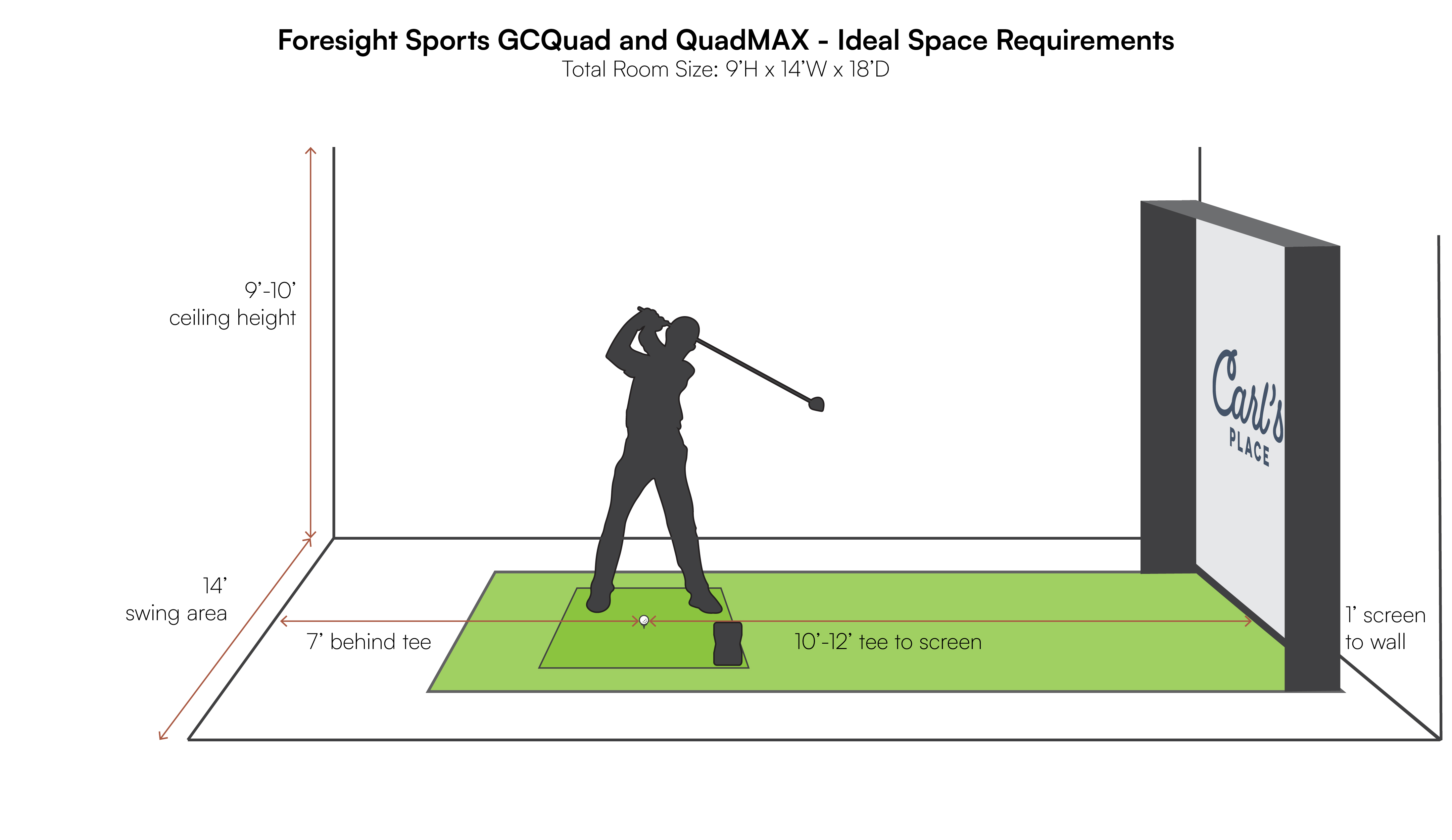
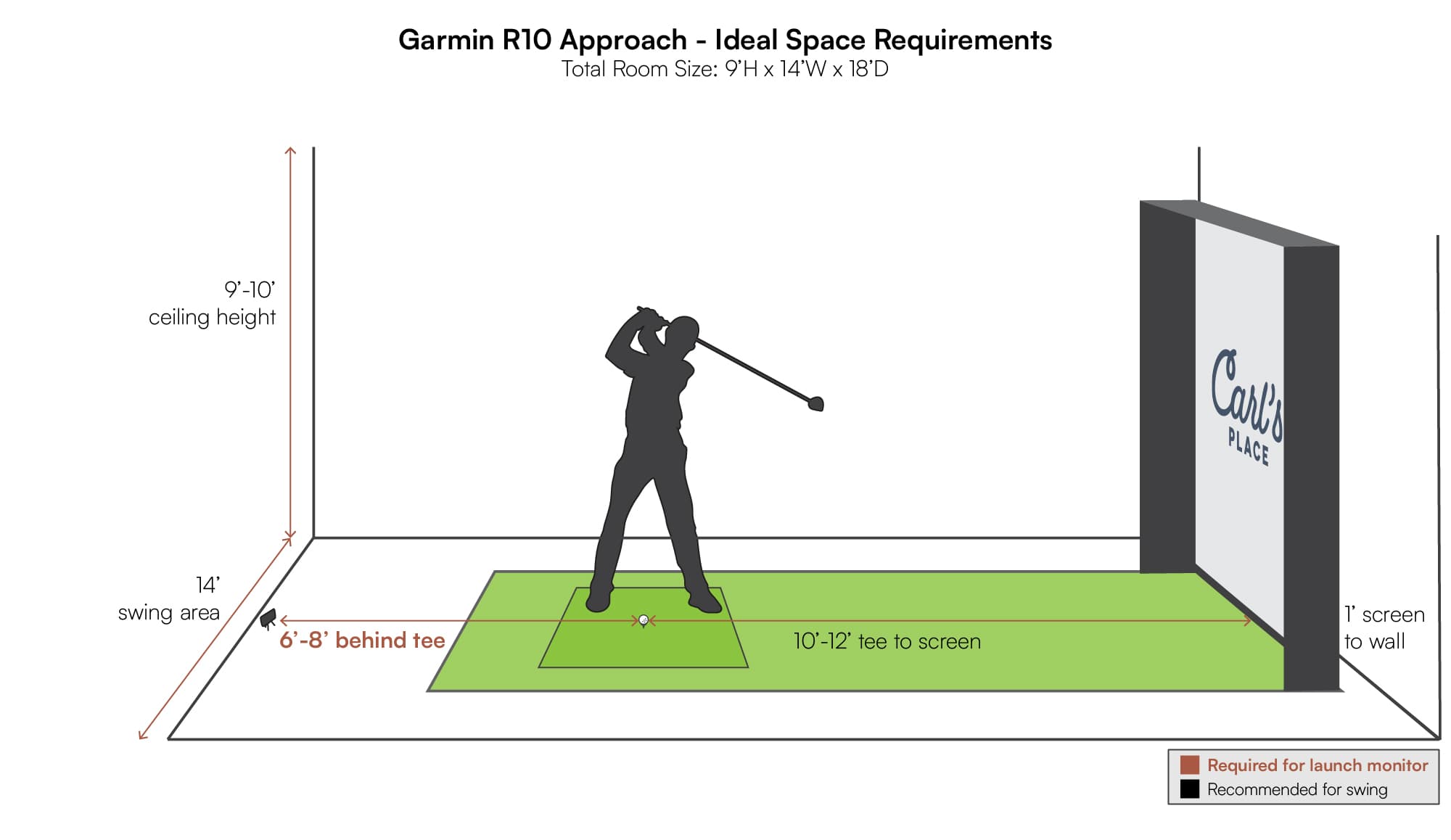
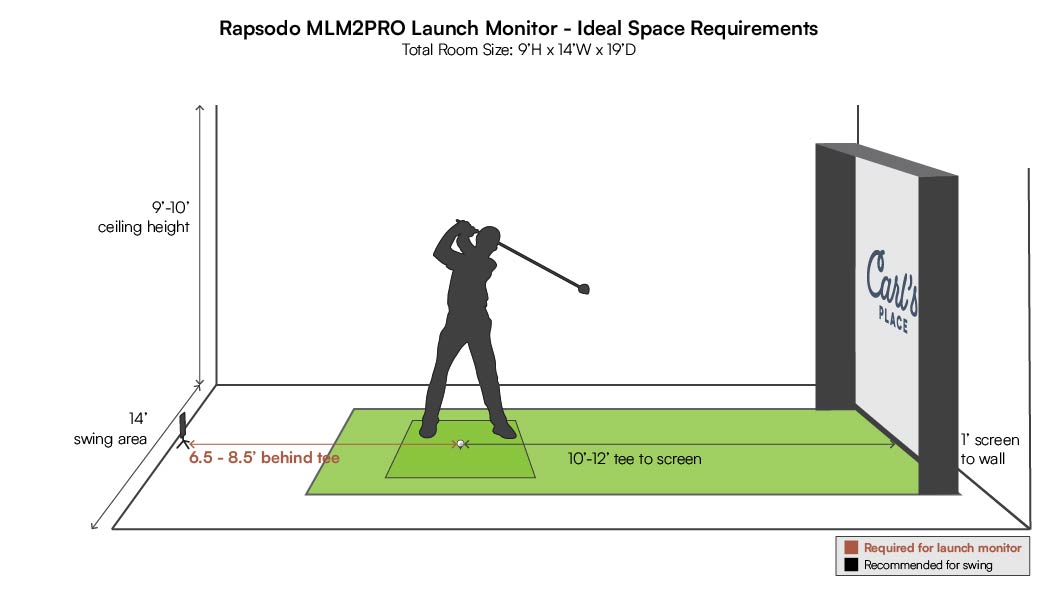
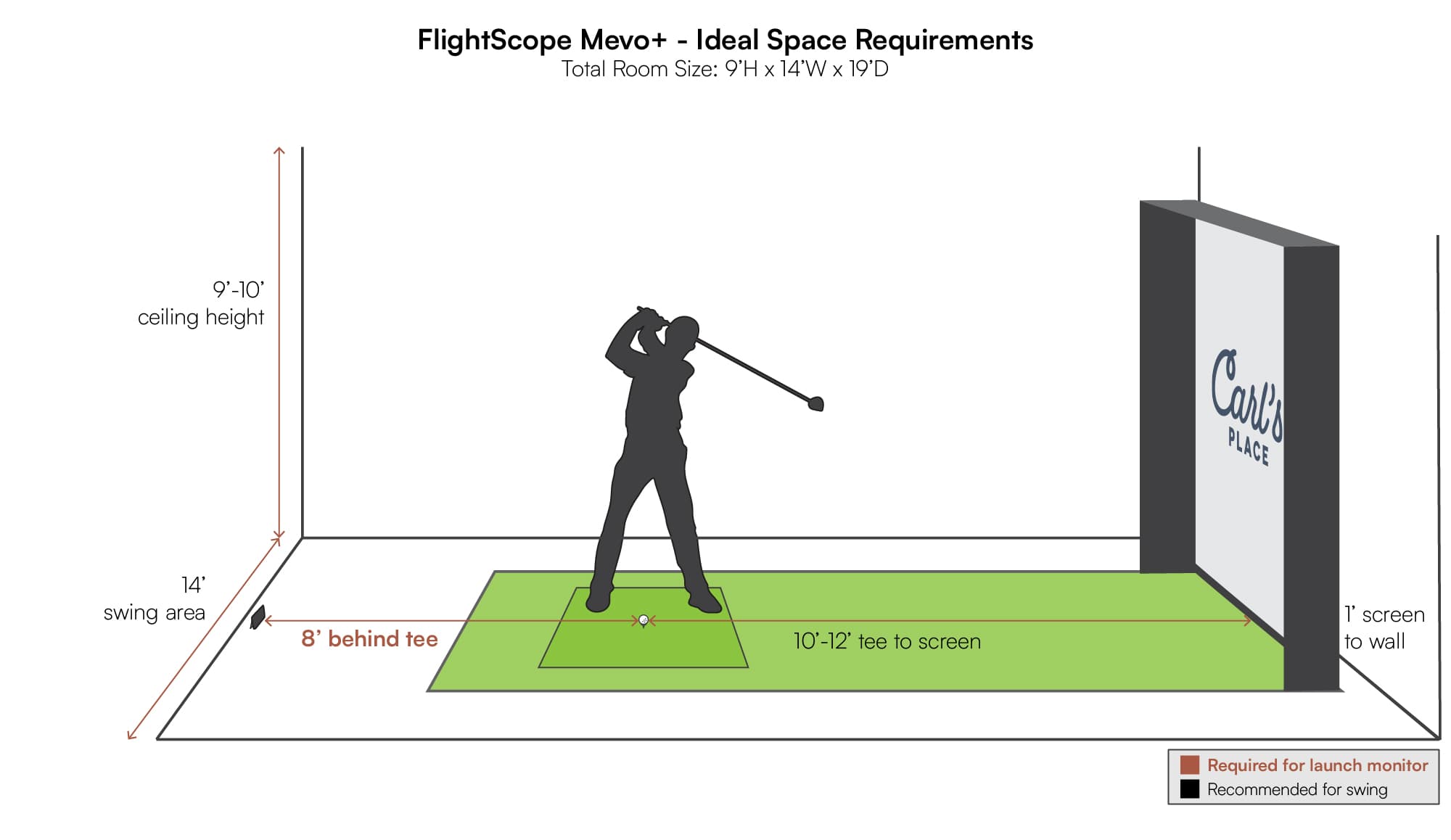
Choosing the right launch monitor comes back to one simple reality check: your room. Shallow depth, low ceilings, and wide open spaces each point to different best fits. The goal is to match how each launch monitor “uses” your room to the space you actually have.
As a general guideline, many indoor golf rooms work well at roughly 18 feet deep, 14 feet wide, and 10 foot ceilings. Some golfers make a sim work with less. Taller players or steeper swings may need more height and depth.
Always confirm exact dimensions, mounting heights, and ball-to-screen distances in each launch monitor’s manual. The layouts below are practical examples of how these models are typically installed, not hard limits.
Space Requirements by Launch Monitor
Below are real-world layout expectations for the launch monitors Carl’s Place carries. Use them to see where each unit sits in the room and what kind of space it prefers. Click any diagram to view it larger.
Uneekor QED / EYE XR
|
Uneekor EYE XO / XO2
|
NVISAGE N1
|
Foresight Falcon / GCHawk
|
Trackman iO
|
ProTee VX
|
Uneekor EYE MINI / EYE MINI Lite
|
SkyTrak+ / SkyTrak Max
|
Foresight GCQuad / QuadMAX
|
Garmin R50
|
Garmin R10
|
Rapsodo MLM2PRO
|
FlightScope Mevo Gen2
|
Full Swing KIT
|
Trackman 4
|
GolfJoy Spica 3
|
GolfJoy GR2
|
Trugolf MultiSport
|
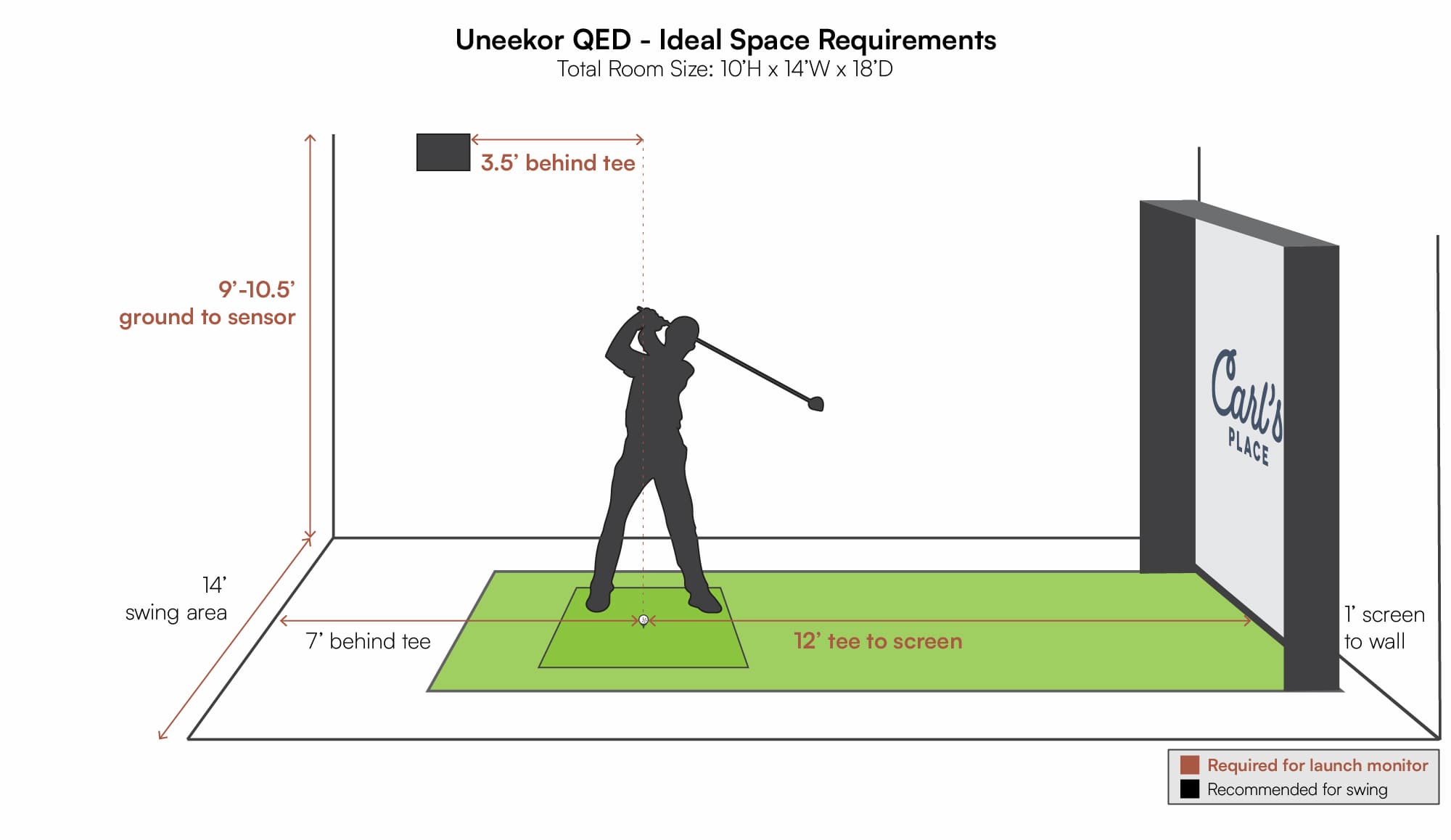
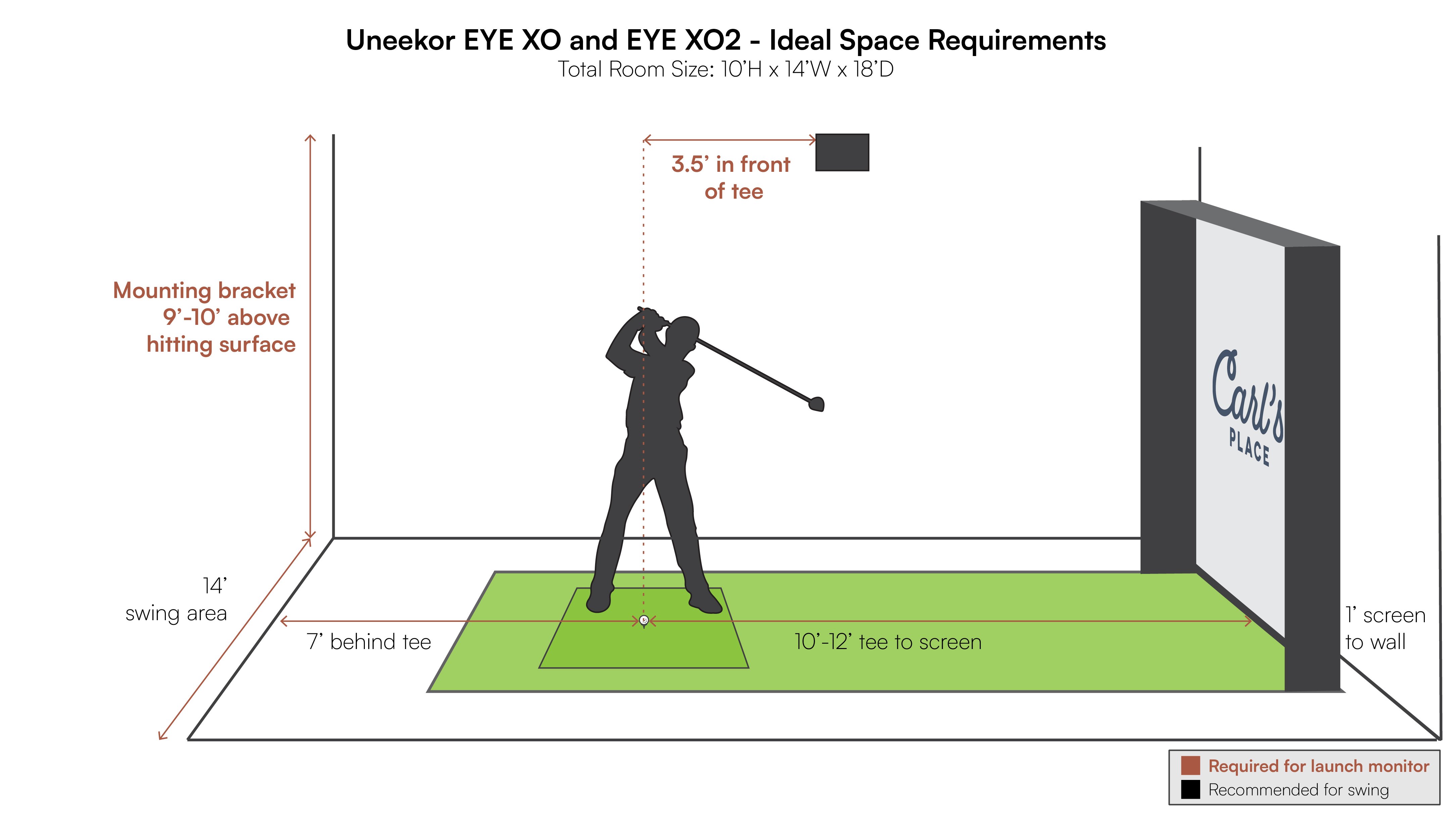
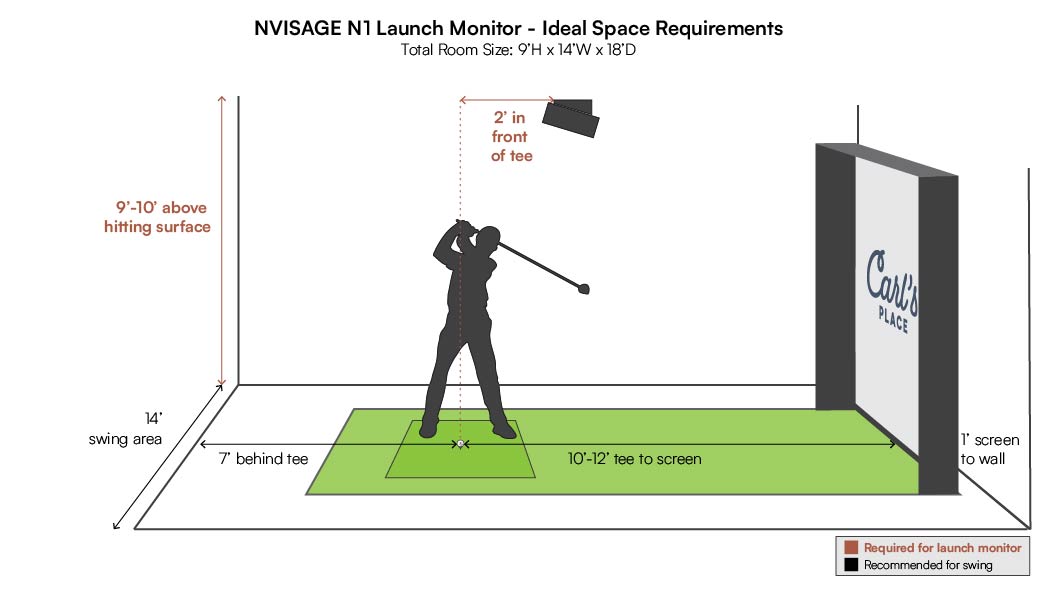
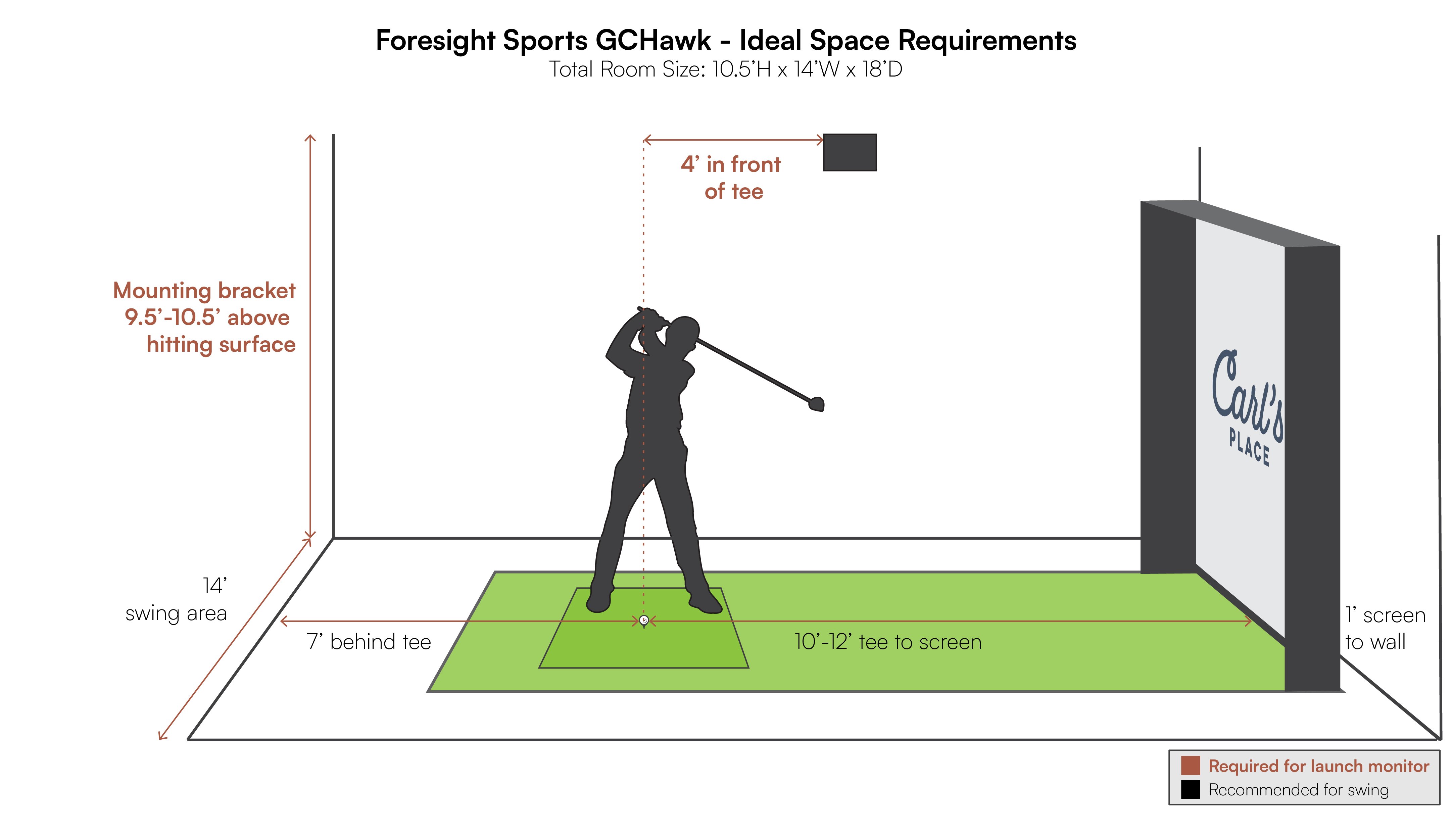
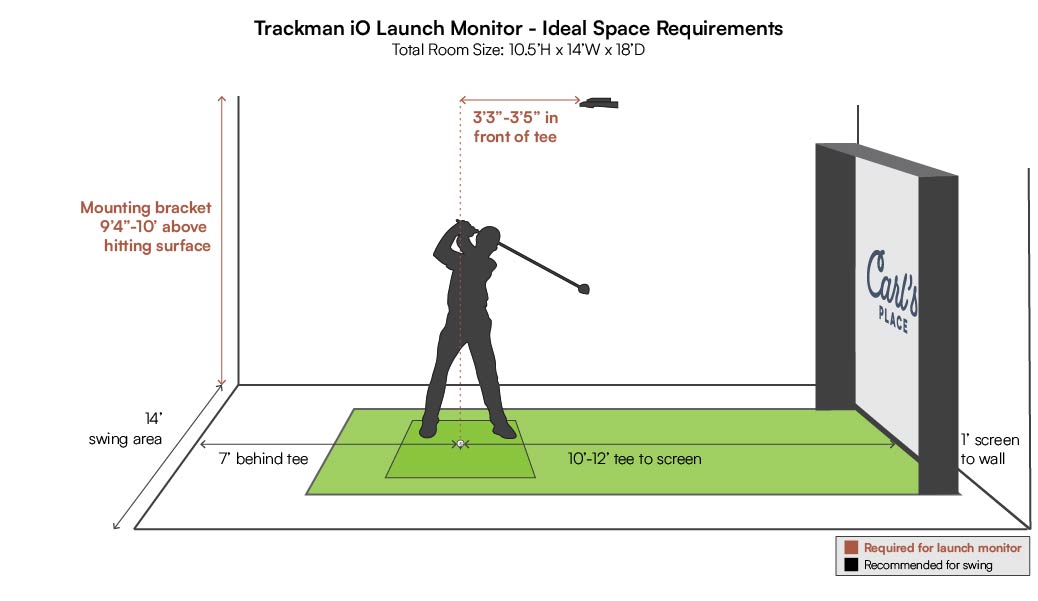
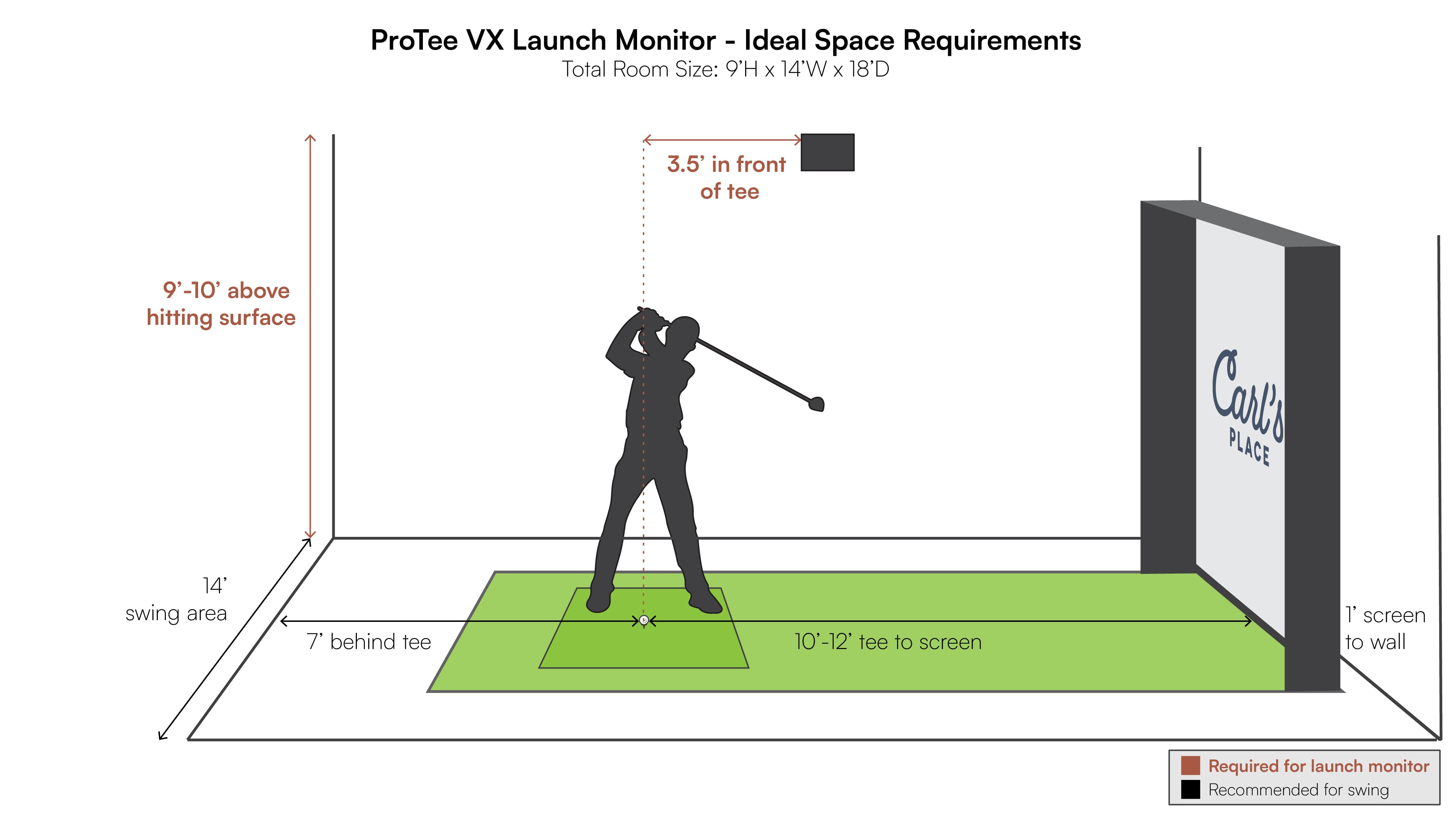
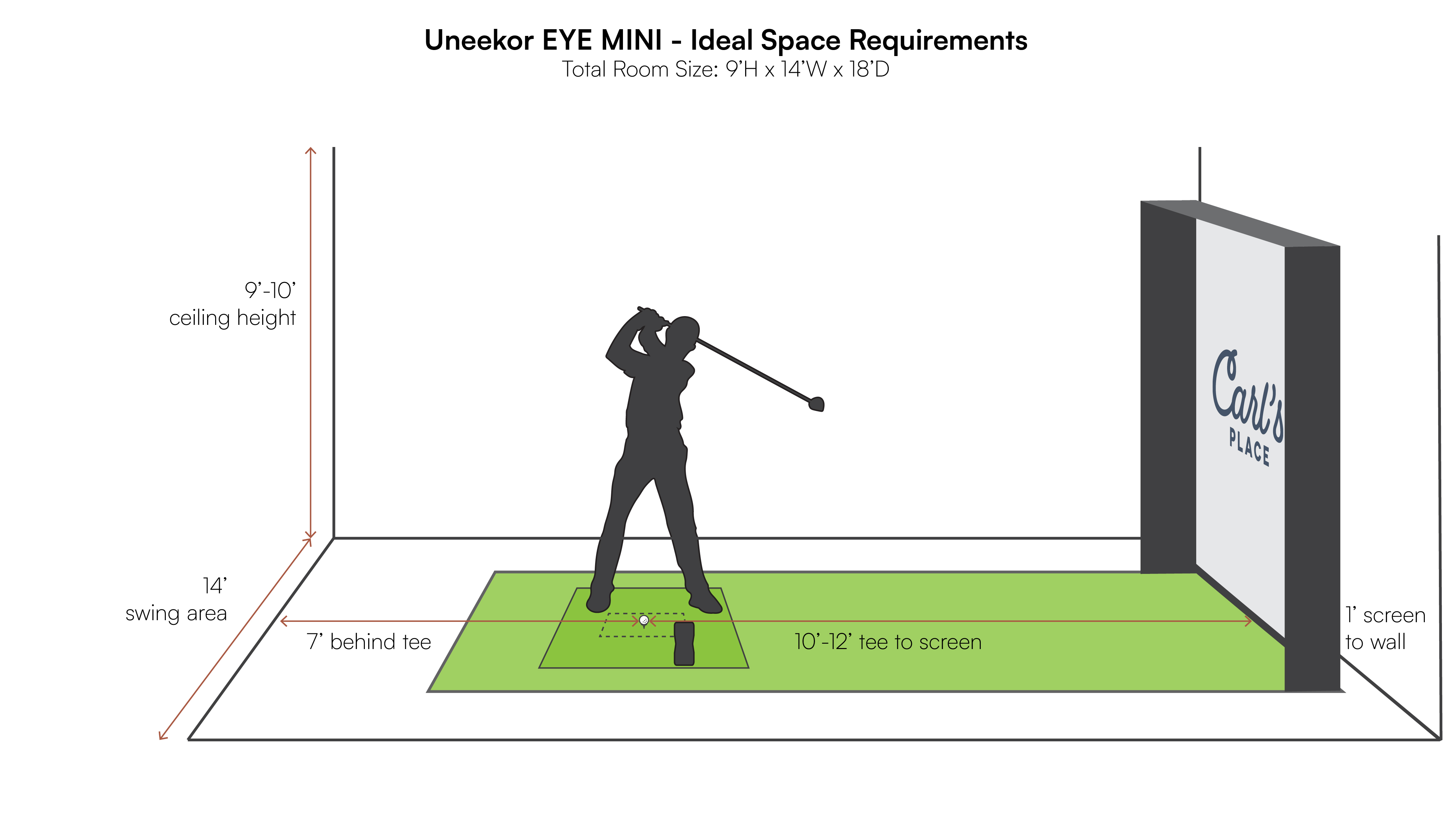
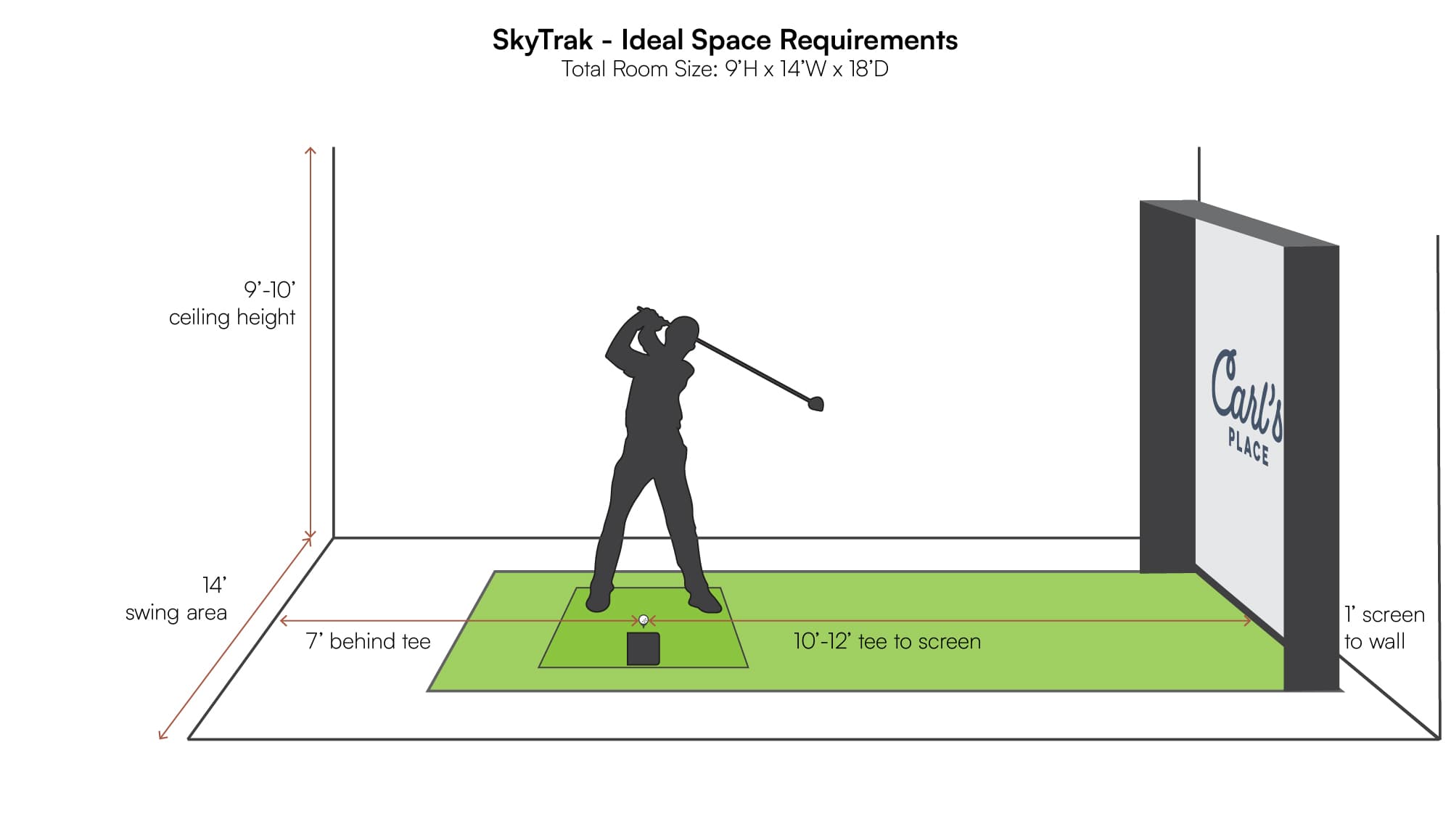
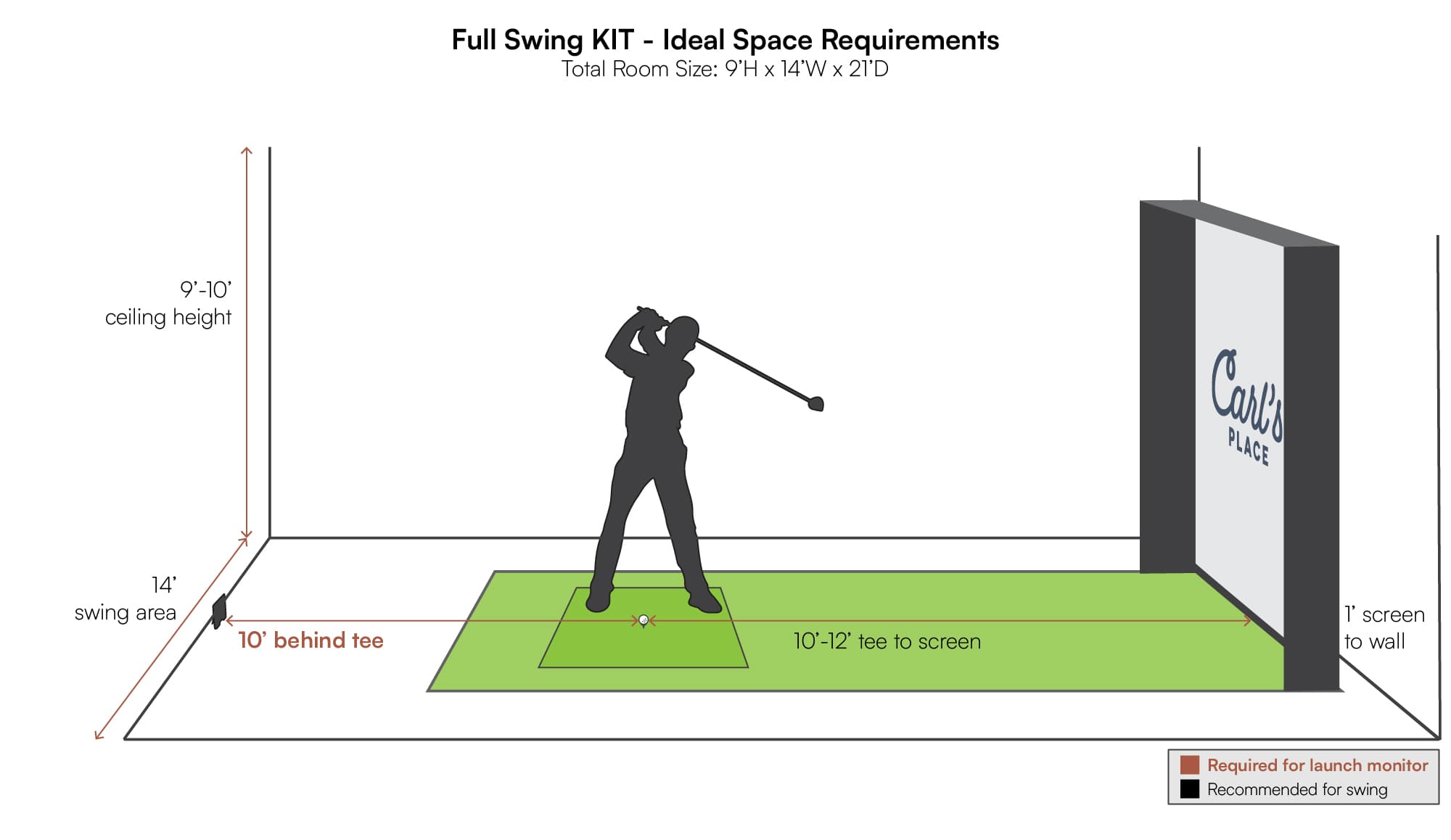
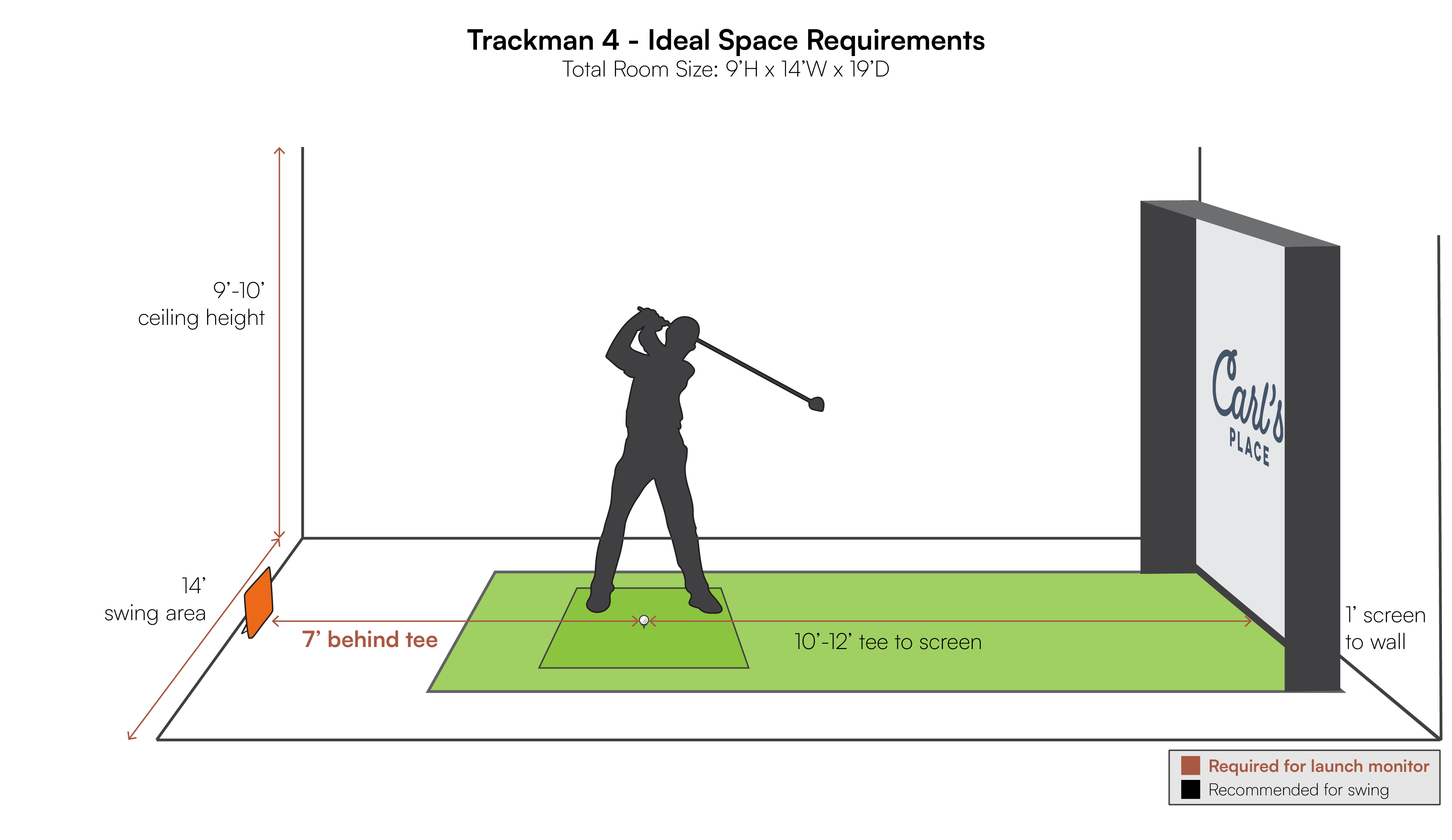
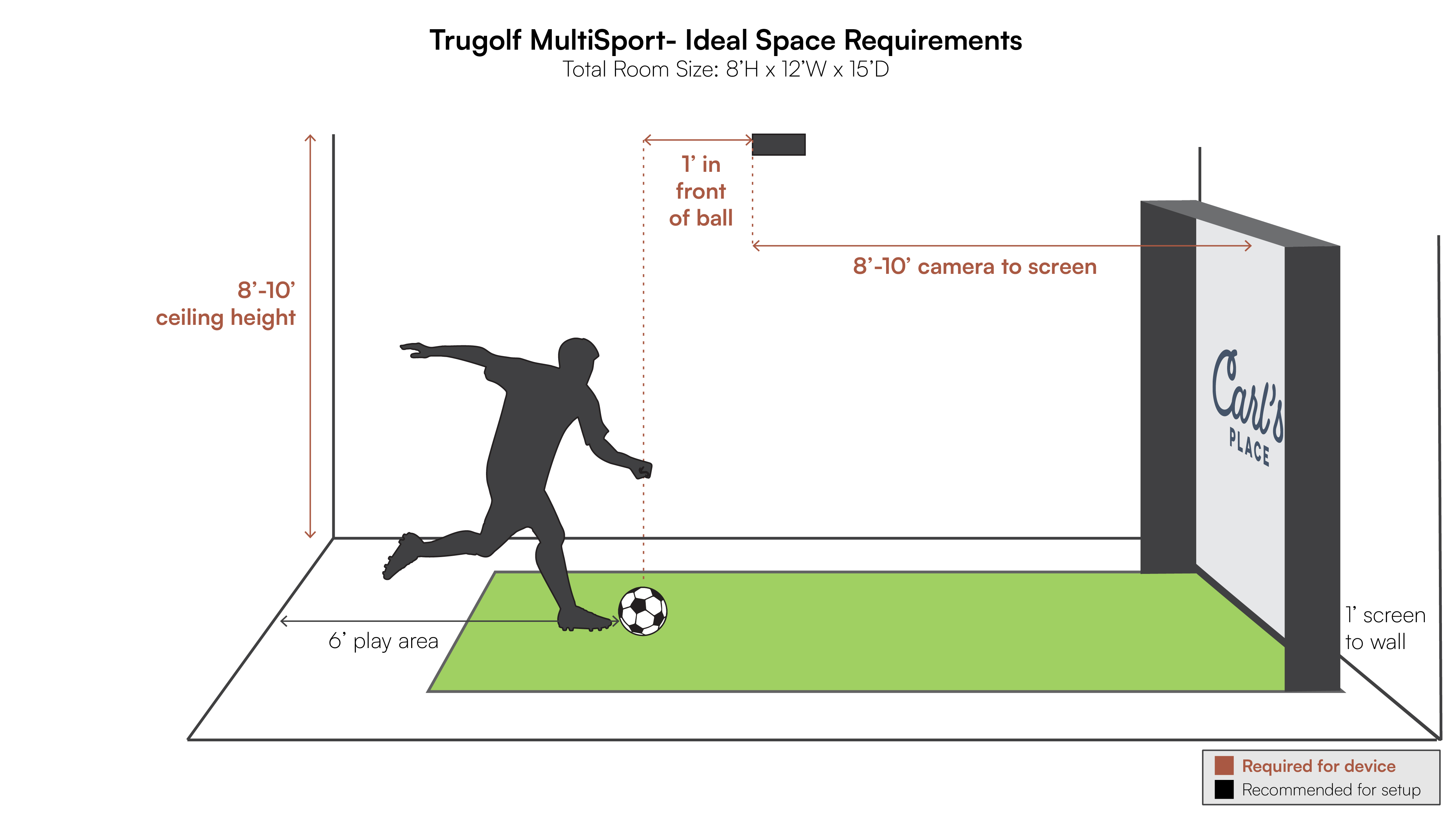
Need more help measuring your room? Our full measuring guide walks through width, height, and depth in more detail, including launch monitor, enclosure, and swing clearance.
Golf Launch Monitor Data
How Accurate Are Launch Monitors?
From our outdoor testing, most launch monitors stay within about 5 to 7 percent of real-life carry distance when they are set up correctly in the environment they prefer. That is more than good enough to work on your game instead of guessing.
We also see a few patterns over and over:
- Occasional strange reads happen on almost every system. One or two wild shots usually point to setup or swing, not a broken launch monitor.
- Shot dispersion and start direction matter just as much as total distance when you are trying to play better golf.
- Lighting, metallic objects, fans, and people walking through the hitting zone can affect some systems. Small tweaks to the environment go a long way.
For deep dives, check out our range tests:
- SkyTrak
- SkyTrak+
- Mevo+ original
- Mevo+ updated testing
- Garmin R10
- Uneekor EYE XO
- Uneekor EYE MINI
- Foresight GC3
- Foresight GCQuad
Launch Monitor Ball Data
You will see different labels across brands, but most launch monitors track some mix of these ball data points:
- Carry Distance: How far the ball flies in the air before landing.
- Total Distance: How far the ball travels until it stops rolling.
- Roll Distance: How far the ball rolls after landing.
- Apex Height: Highest point of the ball’s flight.
- Flight Time: How long the ball stays in the air.
- Ball Speed: Speed of the ball as it leaves the club face.
- Back Spin, Side Spin, Spin Rate, Spin Axis: How fast and in what direction the ball is spinning.
- Vertical and Horizontal Launch Angle: Initial launch angles relative to the ground and target line.
- Lateral Landing: How far left or right of the target line the ball lands.
- Angle of Descent: The angle at which the ball comes down to the ground.
Launch Monitor Club Data
Higher end systems add more detailed club data so you can see why the ball is doing what it is doing.
- Club Head Speed: Speed of the club head just before impact.
- Club Path: Direction the club is moving at impact relative to the target line.
- Club Face Angle: Where the club face is pointing at impact.
- Dynamic Loft and Club Loft Angle: What the loft is doing at impact versus at address.
- Club Lie Angle: How the sole of the club interacts with the ground at impact.
- Impact Location: Where on the face the ball strikes, vertically and horizontally.
- Angle of Attack: Whether the club is moving up, level, or down at impact.
- Smash Factor: Ball speed divided by club speed, used as a quick indicator of how efficiently you are hitting it.
For a coach’s view on which numbers actually matter when you are trying to score lower, see our article on the most important launch monitor data according to a golf pro.
Comparing Golf Launch Monitors
Each golf launch monitor is different, from the price, to the space requirements, to the app and software options, to the captured data parameters.
Some golfers have the budget and desire to see all the data that higher end launch monitors can provide. Others are looking to save money or only need just a couple data points. And, of course, there are some in between.
So, we put together a spreadsheet of the most popular launch monitors to help you understand how each one stacks up against another. Click on the screenshot image below to see the living spreadsheet.
Launch Monitor Comparison Sheet

How Much Does a Launch Monitor Cost?
Sticker shock is normal. High end launch monitors can reach well into five figures. You are paying for:
- More and higher quality data.
- Better software, integrations, and practice tools.
- Hardware that is built to run every day in commercial or teaching environments.
Entry-level radar units like Garmin R10 and some budget camera options keep costs down while still providing the core ball data you need to improve. Mid-range systems like Mevo Gen2, Uneekor EYE MINI, GC3, ProTee VX, or NVISAGE N1 often sit in a sweet spot for serious home golfers. And then the high-end launch monitors, which can price out at well over $20,000, are often out of the average golfer’s budget. These top launch monitors are used by professionals or coaches.
Long story short, you mostly get what you pay for with launch monitors. But no matter what launch monitor you decide is right for your space or budget, you will certainly have the ability to improve your golf game.
Even for the golfers with the most limited budget, it’s possible to create your own indoor golf setup.
Launch Monitors the Pros Use
On tour ranges, in fitting studios, and in high end indoor facilities, you will commonly see:
- Trackman 4: One of the most visible radar systems in professional golf and instruction.
- Foresight GCQuad / QuadMAX and Falcon: Popular in studios and indoor performance centers for deep camera-based data.
- Uneekor EYE XO / EYE XO2 / EYE XR: Increasingly common in indoor performance centers that prefer overhead mounting and detailed club visuals.
- Full Swing KIT: Used by a number of tour players for both outdoor practice and indoor simulators.
The theme is the same. Pros and coaches gravitate toward systems that provide both ball and club data. Serious home golfers can borrow that same thinking even if the exact model is different.
However, some pros have also used more mid-level options as well. Bubba Watson, and quite possibly the most stat-nerdy golfer of them all, Bryson DeChambeau, have spoken highly of Flightscope products.
Cameron Champ says in this post that the Uneekor EYE XO is one of the best launch monitors in the industry.
In this post on Instagram, Full Swing boasts a strong lineup of professional golfers who have one of their units installed in their home. This includes Jon Rahm, Patrick Cantlay, Gary Woodland, Jason Day, Xander Schauffele and Jordan Spieth. Oh yeah, and Tiger Woods, who is one of their official endorsers.
Justin Thomas and Matt Fitzpatrick have social media posts showing them using Foresight Sports launch monitors. Rory McIlroy has also been seen using a Trackman launch monitor.
Launch Monitor Software and Apps
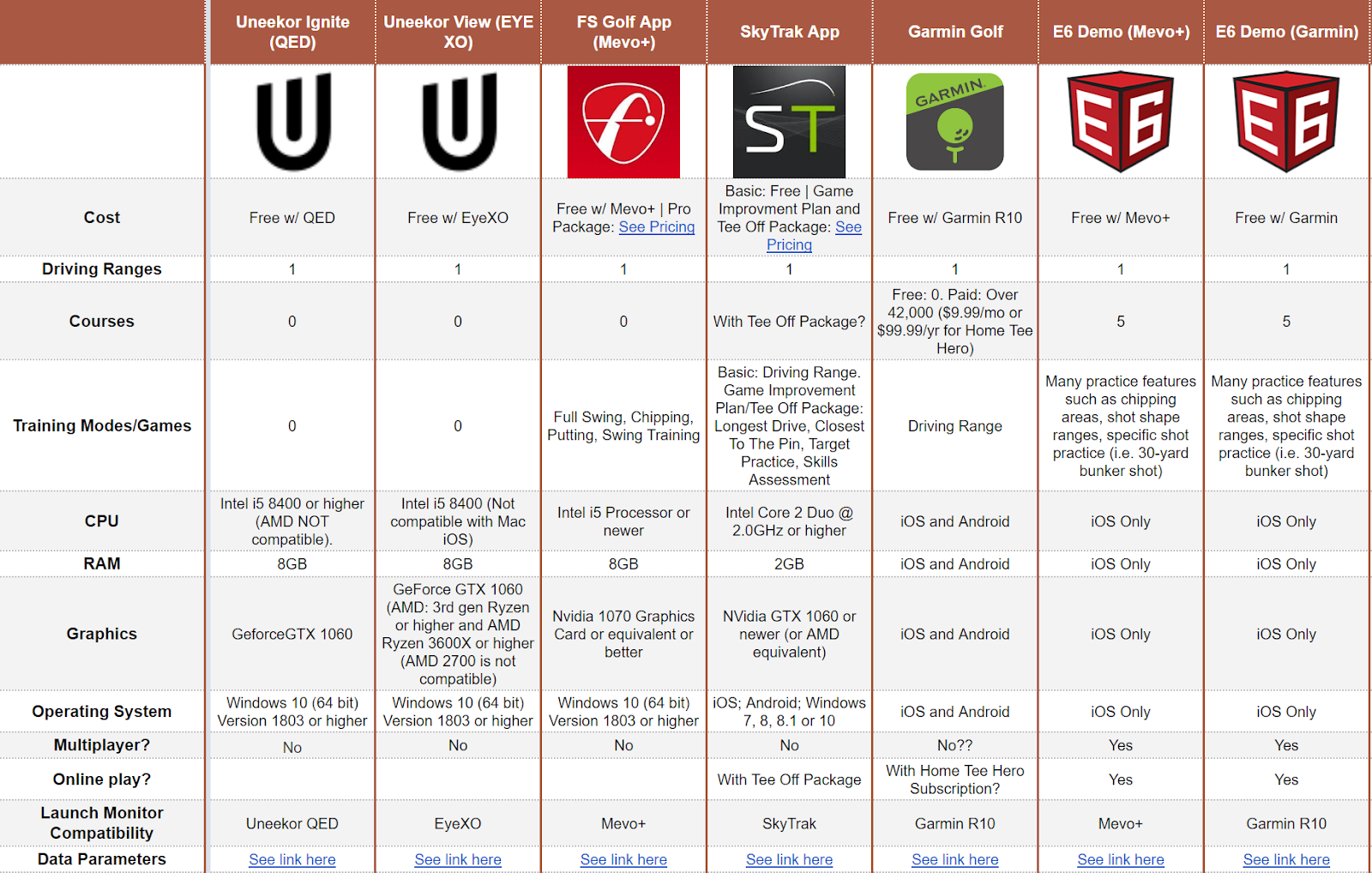
Each launch monitor comes with its own app or software. Most of the time, the free version is just a driving range, which might be enough for people who are strictly looking at and trying to improve their data.
However, if you are looking to play virtual golf courses, you will likely have to pay for an upgrade or for a third-party software package. Some launch monitors work with many third party softwares, while others work with very few. Keep this in mind when you’re doing your research.
Some launch monitors lock you into one software ecosystem. Others are more open. It is worth checking this before you buy if there is a specific software package you already know you want.
Golf Simulator Software Comparison Sheet
Final Considerations
When you are deciding which golf launch monitor is best for you, keep coming back to three questions:
- Your space: Do you have the depth for radar, the ceiling height for overhead, or the tighter footprint that works best with a camera unit beside the ball?
- Your seriousness: Are you mostly looking for fun and basic feedback, or do you want full swing and club analysis that you can use with a coach or fitter?
- Your budget: Does an entry-level radar, mid-range photometric or overhead, or high-end tour grade system make sense for how often and how seriously you will use it?
Get those three lined up and the actual model choice becomes a lot less overwhelming. From there, matching your launch monitor to the right enclosure, screen, mat, and software gives you a simulator you will actually use and that will actually help your game.

This post may contain affiliate links. If you click through and make a purchase, Carl’s Place may receive a small commission at no additional cost to you.
Search articles by tag:
How-To Golf Simulators Garmin SkyTrak FlightScope UneekorRelated Posts
Launch Monitors, NVISAGE
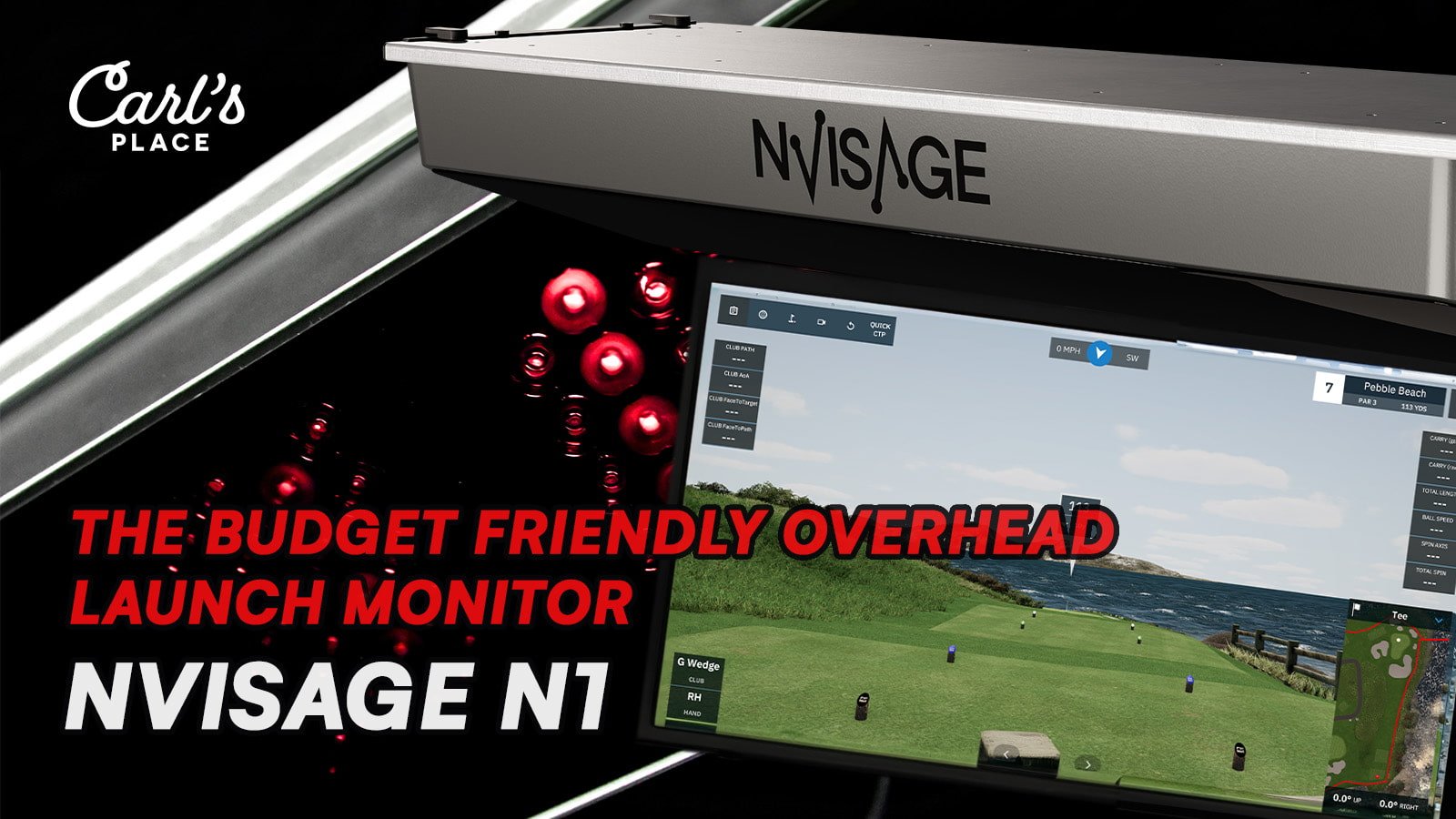
NVISAGE N1 - The Budget Friendly Overhead Launch Monitor

Golf Simulators, Resources, Launch Monitors
Understanding Launch Angles: Overhead vs. Floor-Based Launch Monitors

Launch Monitors
APOGEE Golf Launch Monitor by TruGolf